
Enhanced Tooltip Reader for Web Comics
Overview
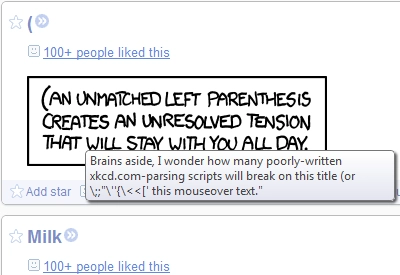
Comic Text is a free Chrome extension designed to improve the readability of mouseover title text on web comics and other web content. Its primary purpose is to replace Chrome’s default tooltip behavior, which often disappears too quickly to read full text. The extension is especially useful for fans of web comics like xkcd, where title text frequently contains punchlines, commentary, or additional context. By extending the tooltip duration to remain visible as long as the mouse hovers over an element, Comic Text ensures users can fully absorb the content without frustration.
Target users include casual web readers, comic enthusiasts, and anyone who frequently encounters title text on web pages. The extension operates silently in the background, requiring no complex setup. It works out-of-the-box on xkcd.com and can be configured to function on other websites through its options panel. The developer, dmillz, has maintained the project since its initial release in 2011, with the latest update in 2018 to meet modern Chrome extension standards.
Real-world usage scenarios include reading detailed explanations in web comics, reviewing metadata on image-heavy websites, or accessing tooltips on interactive web elements. The extension’s ability to scan entire pages and replace tooltips for any HTML element expands its utility beyond comics, making it a versatile tool for improved web navigation.
Key Features & Capabilities
- Extended Tooltip Duration – Replaces Chrome’s default tooltip, which disappears after a few seconds, with a persistent popup that remains visible while the mouse hovers over an element.
- Full Page Tooltip Replacement – New functionality allows the extension to replace tooltips on any HTML element, not just images, expanding its use beyond web comics.
- Customizable Styling – Users can adjust the appearance of the popup through the extension’s options panel, including font, color, and positioning.
- Whitelist-Based Site Support – The extension can be configured to activate only on specific websites, ensuring compatibility and minimizing interference on unrelated pages.
- Open-Source Transparency – The full source code is publicly available on GitHub, allowing users to inspect, modify, or contribute to the project.
These features help users engage more deeply with web content by eliminating the frustration of rapidly disappearing tooltips. For example, a reader browsing xkcd can now read the full punchline without rushing. On other sites, tooltips for buttons, links, or icons can be viewed at leisure. The open-source nature also fosters trust and community involvement, as the code is fully auditable.
User Interface, Workflow & Performance
Comic Text features a minimalistic user interface accessible through the Chrome extensions menu. Users can access the options panel via the wrench icon, then navigate to the extension settings. The interface is straightforward, with clear labels and simple toggles for enabling features like full-page tooltip replacement and custom styling.
Navigating the extension’s settings is intuitive, requiring no technical expertise. The workflow is seamless: install the extension, optionally configure preferences, and begin using it immediately. No additional steps are needed to activate the enhanced tooltips on supported sites.
The developer did not specify resource usage details. Performance observations are based on general software behavior patterns. The extension is lightweight, with a file size of 1.2 MB, suggesting low memory footprint. Stability is expected to be high, given its long-standing presence and minimal functionality. The extension does not run background processes or collect user data, which contributes to a stable and predictable experience.
Compatibility & System Requirements
Comic Text is compatible with Windows, Mac, and Linux operating systems, ensuring broad accessibility across desktop environments. It is designed specifically for the Chrome browser and requires no additional software or dependencies.
The extension version is 2.0.0, released on August 31, 2018, and is updated to meet current Chrome extension requirements. The installation size is 1.2 MB, which is typical for lightweight browser extensions. The developer did not provide additional system requirements.
Exact performance details were not specified. Platform compatibility information is limited to the operating systems listed. The extension is not designed for mobile devices or other browsers.
Pros and Cons
Pros
- Free to use with no hidden costs
- Open-source with full code transparency
- Extends tooltip visibility for better readability
- Supports full-page tooltip replacement beyond images
- Lightweight and low resource consumption
- Simple, intuitive interface with no learning curve
Cons
- Only works within the Chrome browser
- Requires "access to all websites" permission, which may raise privacy concerns for some users
- No official support for other browsers or platforms
- Updates are infrequent, with the last release in 2018
- No in-app help or documentation beyond GitHub
FAQ Section
Is Comic Text compatible with browsers other than Chrome?
Comic Text is designed exclusively for the Chrome browser. It does not support other browsers such as Firefox, Edge, or Safari.
Why does the extension need permission to access all website data?
The extension requires this permission to modify the HTML and CSS of web pages in order to replace tooltips. It only alters content on whitelisted sites and does not collect or transmit user data.
Can I use Comic Text on websites other than xkcd.com?
Yes, the extension can be configured to work on other websites. Users can enable it for specific domains through the extension options.
Is the extension safe to use?
Yes, the extension is open-source and does not communicate with external servers. The developer confirms it does not save any user information beyond its own settings.
How do I report a bug or request a feature?
Users should submit issues directly on the project’s GitHub repository: https://github.com/dmillz/Comic-Text/issues.
Final Thoughts
Comic Text remains a highly effective, no-frills solution for anyone who values readability in web content. Its core function—extending tooltip visibility—addresses a persistent user pain point with Chrome’s default behavior. The extension’s open-source nature, lightweight design, and broad compatibility make it a trustworthy tool for web comic fans and casual readers alike.
While the lack of recent updates and limited browser support may be drawbacks for some, its stability and proven track record over more than a decade of use speak to its reliability. For users who frequently read web comics or interact with title-text-heavy websites, Comic Text offers a simple yet powerful enhancement.
Download Comic Text now







